You know the room. It looks fine on paper. Yet every hybrid call goes sideways. Someone sits too close and looks stretched. Someone else sits on the edge and disappears.
Meanwhile, hallway noise leaks in. So remote attendees miss details. Then IT gets the ticket.
That’s the reality of focus rooms and huddle spaces. They are small. They are busy. And they often host your most frequent meetings.
At Bluechip IT, we help partners, resellers, and MSPs standardise reliable room kits. We do it without overcomplicating the build. In this article, we’ll show you why Yealink A25 fits these compact rooms so well, and how its wide view and clearer audio solve the most common small-room issues.

Hybrid meetings still add pressure to people and tech
Before we get into the hardware, it helps to ground this in a real finding.
Microsoft’s Human Factors Lab ran a study where 14 people joined video meetings while wearing EEG equipment. The research explored meeting fatigue and cognitive load during video calls. That’s small in scale, yet it shows something important. Video meetings can demand more attention and energy than we realise. So, when audio and framing fail, the mental load climbs even faster.
Because of that, the “small room problems” matter. They do not just annoy users. They also drain focus. And focus rooms exist for focus.
What makes focus rooms and huddle spaces uniquely difficult
Focus rooms and small Yealink meeting room builds share a few patterns. So, the same problems show up again and again.
- People sit close to the camera: As a result, faces can warp at the edges. Or they can get cropped. Then, remote viewers lose key visual cues.
- Tables sit against walls: In many offices, the table touches a wall. Sometimes it is curved. So, people end up far left or far right. That is where basic cameras struggle.
- Office noise bleeds in: Air con hums. Keyboards clack. Corridor chatter drifts past the door. Consequently, the far end misses words. Then they ask for repeats.
- Meetings start fast: These rooms serve ad-hoc chats. Therefore, users need simple joins. They do not want a “how-to” lesson each time.
So, the best Yealink video conferencing device for these rooms must do two things well. It must capture everyone. Also, it must keep voices clean.
A25 advantage #1: An ultra-wide view that stays clear in tight rooms
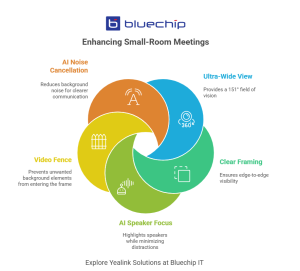
The headline feature is simple. The Yealink meetingbar A25 offers a 151° horizontal field of view. That is built for compact spaces. Yet the useful part is how Yealink delivers that width.
Instead of relying on a single ultra-wide lens alone, the A25 uses a triple-camera system. It combines one ultra-wide lens with two telephoto lenses. So, it can cover the whole room while keeping detail, even near the edges.
That matters in real rooms.
- You can capture wall-to-wall seating.
- You can avoid awkward furniture moves.
- You can stop “the edge seat” from becoming the “invisible seat”.
In other words, you get wide coverage without turning people into tiny faces.
If you sell room kits, this helps a lot. You can standardise one placement. Then you can repeat that layout across sites. So, you reduce variation. And you reduce support calls.
A25 advantage #2: Camera AI that improves meeting equity
A wide shot fixes coverage. However, wide shots alone can feel distant. People want connection. They want faces. They want reactions.
That is where the A25’s on-device AI features help.
IntelliFocus (speaker-based close-ups) keeps attention on the active speaker. So, remote attendees do not stare at a room-wide view for an hour. Instead, they get a more natural flow.
Video Fence sets a visual boundary for the meeting space. As a result, people on the far end only see and hear what is inside that boundary. That helps in busy offices. It also helps in rooms near foot traffic.
Here are two quick use cases.
- Focus room near a busy corridor: Video Fence reduces distractions. So, the presenter stays the centre of attention.
- Huddle space in open-plan: IntelliFocus keeps the meeting engaging. Therefore, remote attendees follow the conversation more easily.
This is not “AI for the sake of AI”. Rather, it targets the exact moments that derail small-room meetings.
A25 advantage #3: Noise-cancelling audio built for real offices
If the camera is the first half of the story, audio is the deciding half. Because when people miss words, they miss decisions.
The A25 focuses on voice clarity in a few ways.
- It supports full-duplex audio. So, people can speak naturally. They do not need to “take turns” like a walkie-talkie.
- It includes AI-enhanced noise cancellation. Therefore, background noise drops away.
- It uses an 8 MEMS mic array and supports about a 5-metre pickup range. That suits typical huddle layouts.
- It also includes a built-in speaker. So, you can avoid extra peripherals in many rooms.
As a result, you get simpler installs. Also, you get fewer “can you repeat that?” moments.
Here’s a practical before-and-after checklist you can use in a discovery call.
What A25 helps remove in small rooms:
- The keyboard clacks near the table
- HVAC hum and fan noise
- Side chatter outside the room
- “Everyone talks over each other” confusion
If you want a consistent, support-friendly room template, Bluechip IT can help you package the right yealink meeting bar solution for each customer size and use case.
Visit Bluechip IT’s Yealink Hub >>
A25 advantage #4: Cleaner installs and faster adoption (partner/MSP-friendly)
Room devices fail in two common ways. First, they get installed poorly. Second, users avoid them because they feel fiddly.
The A25 targets both issues.
Yealink promotes a “one plug” approach for sharing and deployment workflows. So, you can reduce cabling clutter. You can also shorten setup time. That matters when you roll out rooms at scale. It also matters when you support remote sites.
For partners and MSPs, the benefits stack up quickly.
- Faster deployment across multiple rooms
- Easier standardised room templates
- Less onsite troubleshooting
- Fewer user training requests
And because focus rooms are often “high churn” spaces, simplicity counts even more.
Works the way customers work: Teams Rooms plus flexible options
Many customers standardise on Microsoft. Therefore, Yealink Teams Room compatibility matters. The MeetingBar A25 targets Microsoft Teams Rooms on Android. It also supports other platform experiences, including Zoom and BYOD-style workflows.
That flexibility helps partners. You can sell one core platform. Then you can fit it into different customer standards. So, you protect your margins. And you reduce SKU sprawl.

Quick buyer-fit checklist (focus rooms and huddle spaces)
- Use this as a quick qualify tool for your next deal.
- The room seats roughly 2–6 people most of the time
- The table sits close to a wall, or the seating hits the edges
- You need wide coverage without fisheye “punishment”
- Background noise regularly affects meetings
- IT wants fewer boxes and fewer cables
- You want a repeatable build across multiple sites
If you tick most of these, the Yealink A25 makes strong sense.
Small rooms need smarter defaults
Focus rooms and huddle spaces create the most meeting friction. They sit in noisy areas. They get used constantly. And they rarely get special treatment. Yet they host plenty of important calls.
The Yealink MeetingBar A25 fits these spaces because it targets the root issues. First, it captures everyone with a 151° view that still stays clear. Next, it improves engagement through IntelliFocus and Video Fence. Finally, it lifts call quality with AI-enhanced audio and a mic array designed for compact rooms.
If you sell Yealink video conference solutions, that combo matters. It helps you design installs that users actually adopt. It also helps you cut support volume. And it helps you deliver consistent outcomes across customers.
Ready to standardise your next focus room roll-out?
Talk to Bluechip IT about pricing, partner support, and the right Yealink room kit for each customer space.