Have you ever started a live stream or hybrid meeting, only to hear feedback, mismatched voices, or apps fighting over audio? Whether you’re a creator, teacher, or team leader, multi-source audio is a real pain. It’s frustrating, it breaks flow, and it steals attention from what matters: the message.
At Bluechip IT, we understand these challenges because we support partners deploying modern collaboration and content tools every day. We’ve seen how audio complexity can trip up even experienced users. That’s why we want to explore how Insta360 WaveLink cuts through the noise, literally and figuratively, so you can deliver clearer, more consistent audio without juggling cables and mixers.
In this article, we’ll unpack why traditional setups struggle, what WaveLink really does, and how it fits into the broader Insta360 ecosystem. Keep reading to learn how you can simplify multi-source audio and improve experiences for your users, clients, and teams.
Why Audio Complexity Matters: The Facts
Audio isn’t just about volume and clarity. It affects engagement, productivity, and even people’s impressions of a speaker. In fact, 96% of virtual meeting attendees say flawless audio is essential for a successful meeting. When audio fails, conversation stalls and attendees struggle to follow along, which harms outcomes and satisfaction.
Poor audio quality doesn’t just frustrate. Studies show that when sound is distorted or hard to process, listeners’ brains have to work harder to make sense of it, increasing cognitive effort by as much as 35%. This extra strain can slow understanding and negatively impact overall productivity.
In environments where multiple audio sources are blended—say a microphone, music, system alerts and remote participants—these issues don’t just add up. They compound. Without controlled routing and balancing, sound can become uneven, distracting or unintelligible.
That’s where a more intelligent approach to multi-source audio can make all the difference.
The Problem with Traditional Multi-Source Audio Setups
For many creators and organisations, audio complexity stems from reliance on:
- Multiple applications are trying to capture and output sound independently.
- Hardware mixers or interfaces add cost and extra configuration.
- Inconsistent levels across platforms and devices.
- User confusion, especially among non-technical contributors.
These factors often lead to frantic support calls for partners and MSPs. Clients get overwhelmed by audio setup, which drives higher support costs and slower deployments.
What Is Insta360 WaveLink?
Insta360 WaveLink is a software-based audio management platform that brings control and clarity to complex audio setups. Instead of relying on standalone apps and hardware, WaveLink centralises audio routing, mixing, and balancing in one intuitive interface.
WaveLink works seamlessly alongside a suite of Insta360 tools, including:
- Insta360 camera systems for content capture.
- Insta360 webcam and Insta360 Link devices for conferencing.
- Supported Insta360 accessories, including external microphones.
- Remote control tools like Insta360 Remote and collaboration tools like Insta360 Connect.
This means you can handle mics, system sounds, app audio, and remote feeds from one toolbox, without added physical mixers.
How Insta360 WaveLink Simplifies Multi-Source Audio
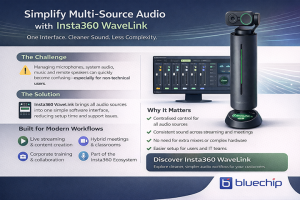
Centralised Audio Control
WaveLink’s single interface lets partners manage all input and output sources in one place. That simplifies setup and reduces confusion.
Software-Based Routing (Less Hardware)
Without extra mixers or interfaces, deployment is faster and more consistent across environments.
Consistent Audio Across Platforms
Whether you’re streaming, recording, or conferencing, WaveLink keeps levels balanced and predictable. That’s a huge win when moving between apps like OBS, Teams or Zoom.
By centralising these features, WaveLink reduces audio friction and supports smoother experiences for users and partners alike.
Are you looking to streamline your client’s Audie setups? Bluechip IT can help. Click the button below to discover how our team supports partners with Insta360 WaveLink, cameras, and accessories, and get personalised guidance for your deployments.
👉 Explore Insta360 Solutions with Bluechip IT
Typical Use Cases for Partners
Here are some of the most common scenarios where partners and MSPs can benefit:
- Live streaming and recorded content creation workflows.
- Hybrid classrooms and lecture capture setups.
- Corporate communications and training sessions.
- Professional collaboration environments using tools like Insta360 Connect.
Each of these benefits from controlled, predictable audio that doesn’t require technical setup.
Where WaveLink Fits in the Insta360 Ecosystem
WaveLink isn’t a standalone tool—it’s part of a broader audio and video workflow. It pairs with:
- Insta360 camera hardware for high-quality capture.
- Insta360 webcam and Link solutions for conferencing.
- Control and connectivity tools like Insta360 Remote and Insta360 Connect.
This positions WaveLink as a key piece of a complete workflow, not just an isolated sound mixer.
Why This Matters for Resellers and MSPs
For partners, WaveLink translates into:
- Faster deployments with fewer moving parts.
- Lower support burden due to centralised configuration.
- Easier training and onboarding for end users.
- More consistent results across different customer environments.
That leads to better satisfaction and fewer help tickets.
Why Source Insta360 WaveLink Through Bluechip IT
As a trusted distributor of Insta360 in Australia, Bluechip IT offers partners:
- Product availability and competitive pricing.
- Presales and solution guidance.
- WaveLink bundles tailored to your needs.
- Local support for quoting and deployment.
Our goal is to help partners build cleaner, more reliable audio workflows with tools that work the first time.
Simplify Audio, Improve Outcomes
Audio complexity doesn’t have to be a roadblock. With Insta360 WaveLink, you can bring multi-source audio under control, reduce friction, and deliver a smoother experience for your end users. When combined with cameras, webcams, and accessories from Insta360, your deployments become easier and more predictable.
If you want to empower clients with professional-grade audio without hardware headaches, WaveLink is worth exploring.
Ready to Transform Audio Workflows?
Simplify setup, reduce support, and delight your customers with better sound.