Virtual learning and hybrid training sessions are now common across many organisations. However, audio issues still disrupt many sessions. Participants struggle to hear instructors clearly. Presentations compete with microphone audio. Meanwhile, switching between audio sources often becomes confusing.
Insta360 WaveLink provides a way to organise and balance audio sources during virtual sessions. The platform allows users to manage multiple inputs in a simple interface. As a result, educators and trainers can focus on teaching instead of troubleshooting sound.
At BluechipIT, we provide access to Insta360 solutions. These include insta360 camera products, insta360 accessories, and collaboration solutions designed for modern communication environments.
In this article we will explore how Insta360 WaveLink supports education and training environments by improving audio management during virtual sessions. Let’s start!
The Role of Audio in Virtual Education and Training
Clear audio is essential for effective online learning. Even high-quality video cannot compensate for poor sound.
A study by Educause found that audio clarity strongly influences learning satisfaction in online environments. Poor sound quality reduces engagement and comprehension for students.
During virtual classes or training sessions, instructors usually manage several audio sources at the same time. These often include:
- instructor microphone
- presentation audio
- video playback
- remote participant questions
Because of this, audio control becomes complex very quickly.
For example, instructors may switch between speaking and playing a training video. At the same time, remote participants may ask questions. Without structured audio routing, levels may become uneven.
Some sounds may overpower others. Meanwhile, other inputs may become too quiet.
Therefore, educators need a simple way to manage audio inputs.
Audio management software helps organise these sources. As a result, trainers can control sound levels more effectively during live sessions.
What is Insta360 WaveLink?
Insta360 WaveLink is an audio management platform designed for streaming, recording, and virtual communication.
The software allows users to control multiple audio inputs in one place. Instead of switching settings across different programs, users can manage sound levels directly through the interface.
Key capabilities include:
- software-based audio routing
- support for multiple input sources
- independent audio level control
- simplified monitoring during recording or streaming
These features help maintain consistent sound across sessions.
In addition, Insta360 WaveLink often works alongside other solutions in the Insta360 ecosystem. For example, many setups combine the platform with:
- Insta360 camera devices
- Insta360 accessories for streaming or recording
- collaboration tools used in education environments
Because of this integration, trainers can manage both video and audio workflows more easily.
Using Insta360 WaveLink in Virtual Classrooms
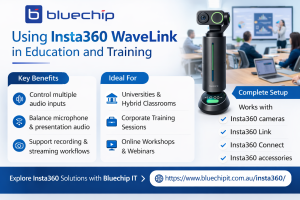
Education teams use Insta360 WaveLink in several learning environments.
Lecture Delivery
Instructors often combine different audio sources during lectures.
Typical inputs include:
- instructor microphone
- presentation audio
- classroom recording systems
WaveLink allows instructors to balance these channels during the session. Consequently, students hear both the presenter and the presentation clearly.
Online Training Workshops
Corporate training often includes multiple audio elements.
These may include:
- trainer microphone
- system audio from training tools
- participant questions
WaveLink allows trainers to control these sources without interrupting the session.
Hybrid Classrooms
Hybrid environments combine in-person and remote participants.
Therefore, audio management becomes more complex.
WaveLink helps organise inputs so that both classroom and remote participants can hear the discussion clearly.
Explore Insta360 Solutions
Resellers and MSPs looking to support education environments can explore Insta360 WaveLink and related solutions through BluechipIT. Learn how Insta360 solutions can support your education and training customers.
Combining WaveLink with Insta360 Camera Solutions
Audio and video must work together for effective virtual communication.
For this reason, many organisations combine Insta360 WaveLink with camera solutions from the same ecosystem.
Examples include:
Insta360 Link
The Insta360 Link is an AI-powered webcam designed for professional communication. It supports high-quality video for online teaching and presentations.
Insta360 Connect
Insta360 Connect supports camera-based collaboration environments. These solutions are commonly used in meeting rooms and hybrid learning spaces.
Insta360 Connect Standard Bundle
The insta360 connect standard bundle provides a structured setup for organisations deploying collaboration systems.
Alongside these products, organisations often deploy insta360 accessories to support recording and streaming workflows.
When combined, these solutions provide:
- coordinated video and audio management
- improved hybrid communication
- simpler recording setups
As a result, instructors and trainers can deliver sessions with fewer technical disruptions.
Education and Training Use Cases
Many organisations benefit from structured audio management in learning environments.
Universities
Universities increasingly rely on hybrid learning. Typical uses include:
- recording lectures for later viewing
- live streaming classes to remote students
WaveLink helps manage multiple audio inputs during these sessions.
Corporate Training
Companies often deliver internal training programs online. Common scenarios include:
- onboarding sessions
- remote learning workshops
Trainers can manage microphones, system audio, and participant questions more easily.
Professional Development Programs
Many professional learning programs rely on webinars or certification sessions. These events often involve multiple speakers. Therefore, structured audio routing helps maintain consistent sound quality.
Why Partners Work with Bluechip IT for Insta360 Solutions
For Australian resellers and MSPs, sourcing collaboration technology often requires reliable distribution support.
BluechipIT works with partners to provide access to Insta360 solutions suited to modern communication environments.
Partners can access various products such as:
- Insta360 camera products
- Accessories
- WaveLink bundles
- Connect collaboration solutions
In addition, Bluechip IT supports partners with:
- product availability and ordering
- presales product guidance
- partner resources
- training where available
This approach helps resellers deliver practical solutions for education and training environments.
Conclusion
Education and training environments increasingly rely on virtual and hybrid communication. Because of this shift, audio management has become more important than ever.
Multiple audio sources often operate at the same time during online sessions. Without proper control, instructors may struggle to maintain clear sound.
Insta360 WaveLink helps organise these inputs in a structured way. As a result, educators and trainers can deliver sessions with clearer and more consistent audio.
Explore Insta360 Solutions with Bluechip IT
Support your customers with reliable collaboration and audio solutions. Bluechip IT provides access to Insta360 WaveLink, insta360 camera products, and insta360 accessories for resellers and MSPs.