Many classrooms and meeting rooms across Australia still struggle with the same challenges. Technology is present, yet collaboration often feels awkward and fragmented. Teachers move between laptops and whiteboards to explain ideas clearly. Meeting hosts spend valuable time connecting cables, adjusting inputs, and troubleshooting basic issues. These interruptions may seem small, but over time, they reduce engagement and disrupt the flow of work and learning.
At the same time, expectations have increased. Educators want displays that support interaction without adding complexity to the lesson. Businesses expect meeting rooms to work smoothly for both in-room and remote participants. IT teams expect to deliver these outcomes while managing security, budgets, and long-term support. In this environment, the interactive displays should be reliable, intuitive, and built for everyday use rather than novelty.
This is where the CommBox Classic S5 becomes relevant. Designed in Australia for education and professional environments, the Classic S5 focuses on practical collaboration rather than unnecessary features. Distributed locally through Bluechip IT, it is available to resellers and MSPs supporting customers across the country.
This article focuses specifically on the CommBox Classic S5, explaining what it is, why it suits Australian environments, and how partners can support it effectively in real-world deployments.

Why Interactive Displays Matter in Today’s Work and Learning Spaces
Australian workplaces and classrooms have changed significantly in recent years. Hybrid work and blended learning are now common across many sectors. However, many physical spaces were not originally designed to support this shift. Displays that once served as simple presentation tools are now expected to support interaction, discussion, and collaboration.
According to Microsoft’s 2023 Work Trend Index, 73% of employees want flexible work options, while organisations continue to rely on shared spaces for collaboration and decision-making.
Because of this, static commercial displays are no longer enough. Users need to interact with content directly, whether they are annotating a lesson, reviewing documents in a meeting, or collaborating with remote participants. Interactive displays like the Classic S5 help close this gap by bringing collaboration onto the screen itself, without requiring complex setups or additional hardware.
What Is the CommBox Classic S5?
A question often asked by customers is straightforward: What is a CommBox?
In simple terms, a CommBox is an interactive display designed to support collaboration, teaching, and presentation.
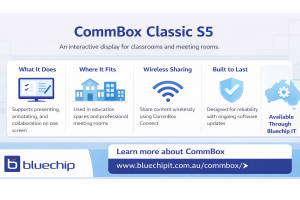
The CommBox Classic S5 is a large-format touchscreen display that allows users to write, draw, and interact directly on the screen. Unlike standard commercial panels, it includes an integrated operating system and built-in collaboration tools. This means users do not need to rely on external PCs for basic interaction.
The Classic S5 fits naturally into classrooms and meeting rooms. In education settings, it supports lesson delivery, annotation, and group interaction. In business environments, it supports presentations, workshops, and hybrid meetings. Its purpose is clear: to make collaboration easier for users while remaining manageable for IT teams.
Why the Classic S5 Works in Australian Environments
Australian classrooms and workplaces share several practical characteristics. Rooms vary in size. Users have different levels of technical confidence. Downtime is rarely acceptable, particularly during lessons or client meetings.
The Classic S5 was designed with these realities in mind. Its interface feels familiar to users who already work within Google and Microsoft ecosystems. This reduces the learning curve and helps users feel comfortable from the first session. As a result, teachers can focus on teaching, and teams can focus on discussion rather than on learning new technology.
Reliability is also a key consideration. Schools and organisations often plan deployments over several years. The Classic S5 is designed for long-term use, which makes it suitable for environments where consistency and durability matter.
Interactive Features That Matter in Real Rooms
Interactive features only add value when they support real use cases. The Classic S5 focuses on interaction that feels natural rather than forced.
Touch performance allows smooth writing and drawing, which is important for both teaching and collaboration. Multiple users can interact with the display at the same time, supporting group work and shared discussion. Built-in annotation tools allow users to mark up documents, presentations, and web content during sessions.
In practice, teachers use the Classic S5 to explain concepts visually and respond to student input in real time. In meeting rooms, teams use it to review documents, map ideas, and capture discussion points. At the end of a session, work can be saved and shared, ensuring ideas are not lost.
Wireless Sharing on the Classic S5 with CommBox Connect
Wireless sharing is now expected in modern spaces, yet it remains a common source of frustration. Cables, adapters, and input switching often slow meetings and lessons before they begin.
The Classic S5 supports wireless sharing through CommBox Connect. This feature allows users to share content from their devices directly to the display without additional hardware. Teachers can move quickly between content sources, while meeting participants can present without disrupting the flow of discussion.
For BYOD environments, this simplicity is important. Guest presenters can share content where supported, and sessions begin with less setup time. If partners need assistance planning Classic S5 deployments that include wireless sharing, Bluechip IT can help with guidance and practical support.
Security, Updates, and Longevity of the Classic S5
For IT teams, security and lifecycle management are critical considerations. The Classic S5 operates on CommBox OS, which receives ongoing updates throughout the product lifecycle. These updates focus on security improvements, performance enhancements, and continued compatibility.
This approach helps protect customer investment by extending the useful life of the display. It also reduces the need for early replacement, which is important for organisations managing long-term budgets. For partners, this creates opportunities for ongoing support rather than one-off installations.
Managing and Supporting the Classic S5 at Scale
Managing displays across multiple rooms or sites can be challenging without central oversight. The Classic S5 supports centralised device management, allowing IT teams to monitor displays, manage settings, and deploy updates remotely.
This capability reduces the need for frequent on-site visits and helps resolve issues more quickly. For MSPs, it also supports managed service offerings that include display management as part of a broader support model. Over time, this reduces maintenance effort for customers and improves reliability.
Supporting Classic S5 Projects Through Bluechip IT
Successful display deployments depend on more than the hardware itself. Planning, quoting, and ongoing support all influence outcomes. Bluechip IT supports partners throughout the Classic S5 lifecycle, from initial discussions through to deployment and support.
Partners gain access to local stock, distributor-level guidance, and practical assistance during rollout. Local distribution also reduces delays and provides clarity when support is needed. For resellers and MSPs, this support helps reduce risk and improve consistency across projects.

Why the CommBox Classic S5 Remains a Practical Choice
The CommBox Classic S5 addresses real challenges faced by Australian classrooms and meeting rooms. It supports interaction without unnecessary complexity, enables wireless sharing that reduces friction, and benefits from ongoing updates that protect long-term value.
With the support of Bluechip IT, partners can deliver the Classic S5 confidently, focusing on outcomes rather than workarounds.
Ready to Support Your Next CommBox Classic S5 Project?
Access the CommBox Classic S5 with local distribution and partner support. Bluechip IT helps resellers and MSPs plan, deploy, and support interactive display solutions across Australia.